Plan for the next storm on one map.
CivicMaps gives emergency management and partner departments a detailed map of the municipality to plan staging areas, routes, closures, and evacuation zones before an event, not during it.
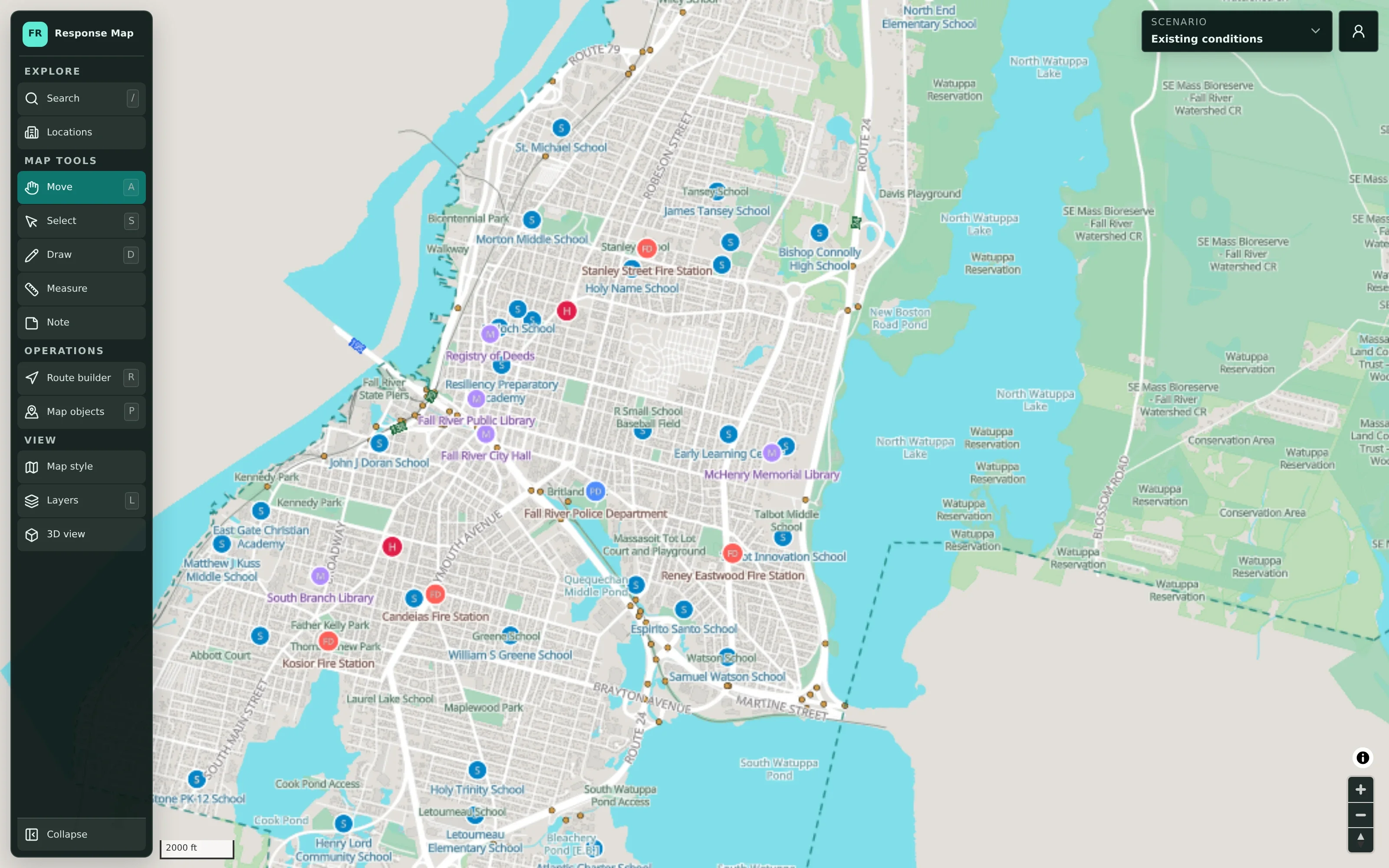
Preparedness plans are hard to see and harder to update.
Hazard plans often live in PDF annexes and printed maps that were accurate when they were written. When a storm is forecast, staff spend valuable preparation time reconciling old maps, confirming which facilities are where, and redrawing routes by hand.
- Static maps fall out of date between events
- Hazard areas and facilities sit in different documents
- Each department plans from its own assumptions
How planners build an emergency plan.
- Step 1
Start from the base map
Streets, buildings, water, boundaries, and public facilities are already on the map, prepared from public geographic data.
- Step 2
Check the hazard reference
Switch to the Flood Risk or Terrain view to see mapped flood-hazard areas and relief beneath your plan.
- Step 3
Mark decisions and impacts
Draw hazards, road closures, evacuation zones, and safety areas, and place command and assembly locations.
- Step 4
Plan routes
Use the route builder to lay out evacuation routes, detours, and staging access, and measure distances as you go.
Emergency Planning in detail
Mapped flood risk and terrain beneath the plan.
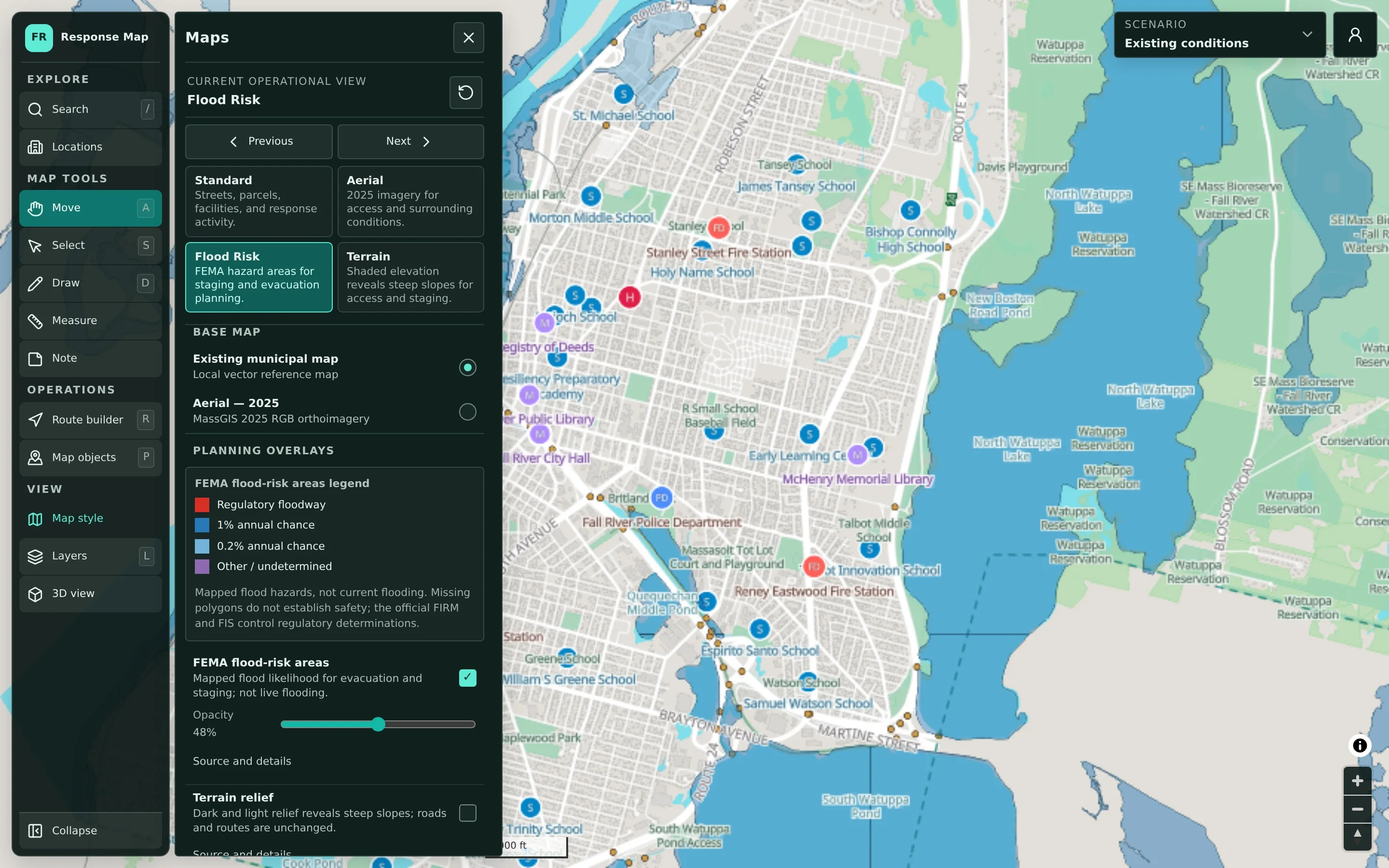
Four map views answer different planning questions: Standard for streets and facilities, Aerial for recent imagery, Flood Risk for mapped FEMA flood-hazard areas, and Terrain for relief. The flood overlay has a legend and an adjustable opacity so planners can see the plan and the hazard together. It is clearly labeled as mapped hazard, not current flooding, and the official flood maps still govern regulatory decisions.
- Standard, Aerial, Flood Risk, and Terrain views
- FEMA flood-hazard legend with opacity control
- Clear labeling of reference data versus conditions on the ground
Decisions kept apart from reference data.
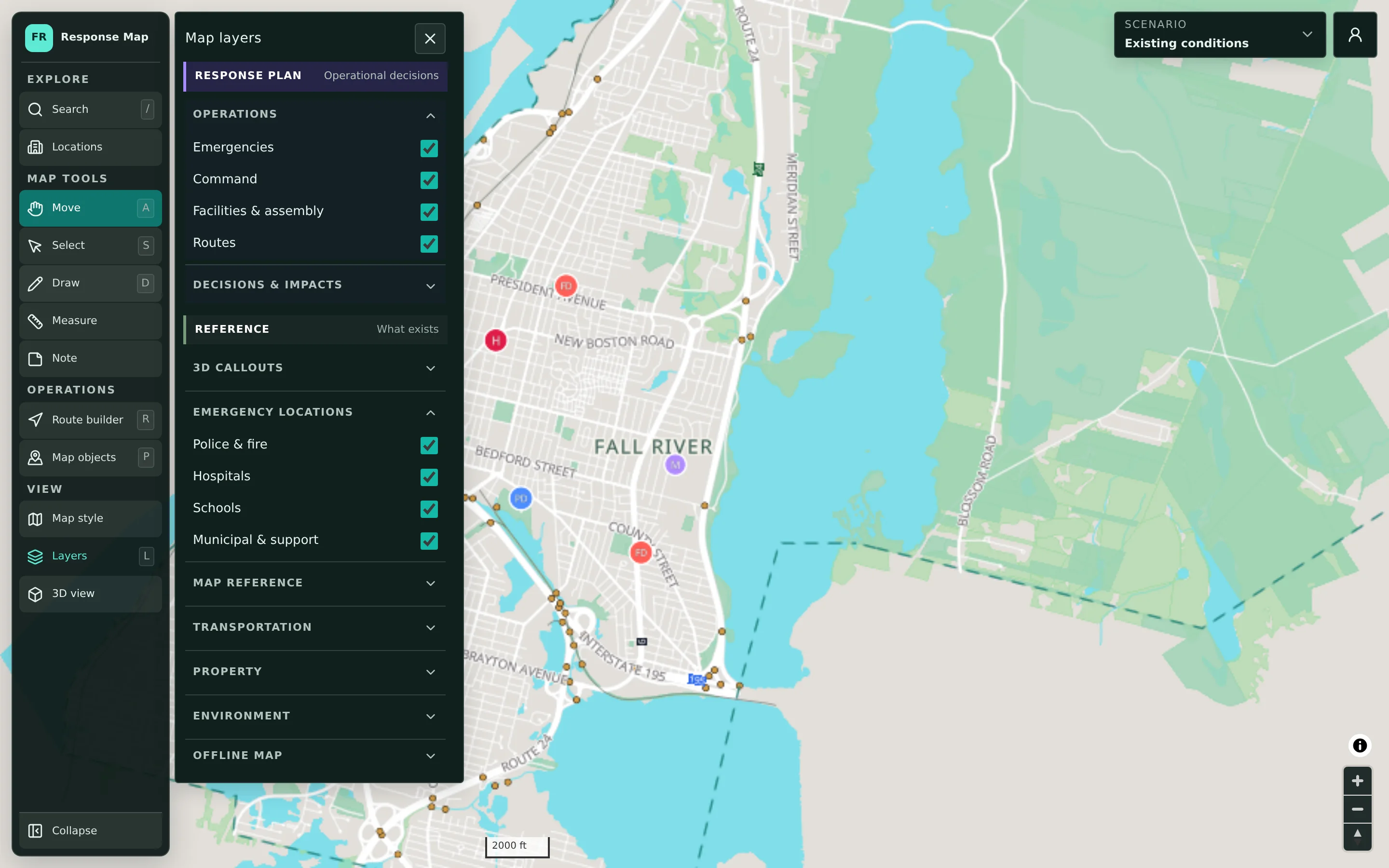
Plan content lives in its own layer group: emergencies, command, facilities and assembly, routes, and a Decisions & impacts group for hazards, road closures, evacuation zones, access and obstructions, and alert and safety areas. Reference layers such as emergency locations, transportation, property, and environment sit in a separate group. Planners can turn any layer on or off without confusing what was decided with what already exists.
- Operational layers for command, facilities, and routes
- Hazards, closures, and evacuation zones as decision layers
- Reference layers for transportation, property, and environment
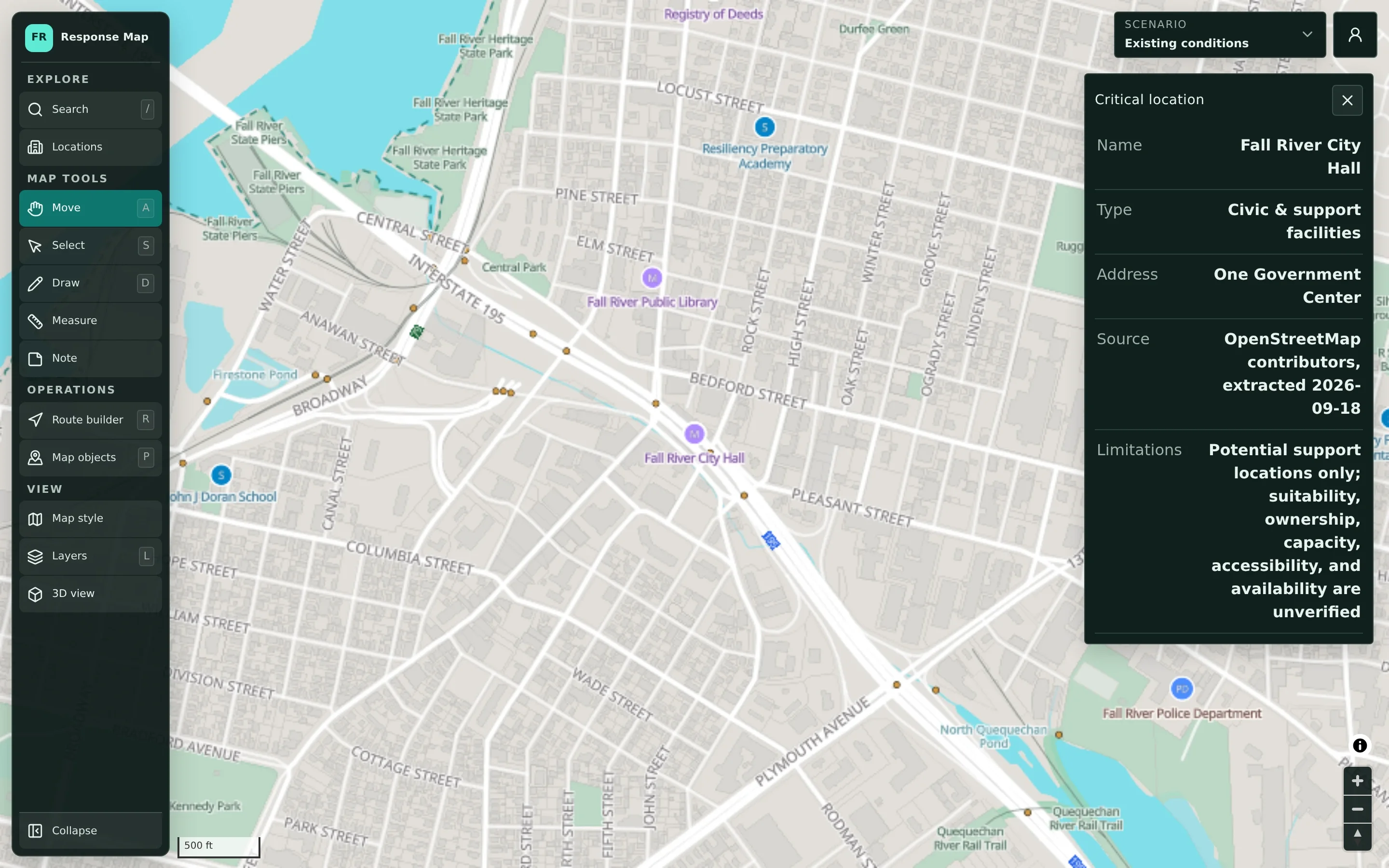
Every location shows where its data came from.
Selecting a public facility opens a detail card with its type, address, data source, and the date the data was extracted. Each card also states its limitations, for example that a building’s suitability, capacity, or availability as a support location has not been verified. Planners know what they are working with before they build a plan around it.
- Data source and extraction date on each location
- Stated limitations for potential support sites
- Schools, fire, police, EMS, hospitals, and municipal facilities
Example: preparing for a coastal storm
An illustrative example of how an emergency management director in a town might use CivicMaps in the days before a forecast nor’easter.
CivicMaps supports planning before and between events. During an actual emergency, response is directed through your established dispatch and incident command systems.
The director duplicates last year’s coastal storm scenario so the new plan starts from previous decisions instead of a blank map.
With the Flood Risk view turned on, they compare the mapped flood-hazard areas along the shoreline with the evacuation zones in the plan.
They mark likely road closures on two low-lying roads and use the route builder to sketch a detour that stays outside the mapped hazard areas.
They review the detail cards for two schools under consideration as assembly sites, noting that capacity and suitability still need confirmation with the school department.
Public works and police add their own staging and traffic-control locations to the same scenario before the pre-storm briefing.
Practical benefits for your municipality.
A head start before every event
Plans built and refined between events mean less redrawing when a storm is forecast.
Hazards and plans in one view
Mapped flood risk, terrain, and facilities sit directly beneath planning decisions.
Honest about the data
Source and limitation notes help planners avoid assuming more than the data supports.
No GIS expertise required
Planners use drawing, routing, and layer tools directly. CivicTally prepares the base map.
Keep exploring.
Features that work alongside emergency planning, in CivicMaps and across the CivicTally portfolio.
Is CivicMaps used during an emergency?
CivicMaps is for high-level planning and coordination before, between, and after events. It is not real-time software, dispatch, CAD, or an incident command system, and it does not show live incident or vehicle data. A plan prepared in CivicMaps can still serve as a shared reference during briefings.
What hazard information is on the map?
The Flood Risk view shows mapped FEMA flood-hazard areas, and the Terrain view shows relief. These are reference layers for planning, not live conditions. Missing flood polygons do not mean an area is safe, and official flood maps control regulatory determinations.
Which facilities are included?
The base map includes publicly listed facilities such as schools, fire and police stations, EMS sites, hospitals, municipal buildings, public works, and water facilities, assembled from public sources. Each location shows its source and limitations, and your municipality can provide additional data during implementation.
Can we plan evacuation routes and detours?
Yes. The route builder lets planners lay out evacuation routes, detours, and access routes, and the measure tool helps check distances. Routing requires an internet connection.
Can we use the map without an internet connection?
The map can be downloaded to a device for offline reference. Editing scenarios and building routes still require a connection.
See emergency planning with your own municipality in mind.
We’ll walk through CivicMaps using your departments, categories, and goals — and answer the practical questions about setup.