CivicMaps
Emergency & Municipal Planning
Bring every department together around one clear plan.
CivicMaps helps municipalities create, organize, and share interactive planning maps for emergency preparedness, tabletop exercises, and coordinated municipal operations.
- Multiple scenarios per map
- Plan layers kept separate from reference data
- Private by default, shared by choice
Plans live in binders, slide decks, and people’s heads.
Emergency and operational plans are often spread across PDF annexes, printed maps, whiteboard photos, and the memory of a few experienced staff. When departments meet to plan — or to run a tabletop exercise — they spend the first hour just agreeing on what the map looks like.
No shared picture
Police, fire, DPW, schools, and administration each work from different maps and assumptions.
Static plans age quickly
Printed maps and PDFs are hard to update and harder to keep consistent across departments.
Hard to share safely
Partners and neighboring communities need the right parts of a plan — not everything, and not by email attachment.
Create a scenario. Build the map. Collaborate. Share.
CivicMaps gives every planning effort its own scenario on a shared base map of your municipality.
- Step 1
Create a scenario
Start a new planning scenario — a storm, a large event, an exercise — or duplicate an existing one.
- Step 2
Build the map
Draw areas, place command and support locations, plan routes, and add notes on top of reference layers.
- Step 3
Collaborate
Authorized staff from each department contribute to the same scenario from their own accounts.
- Step 4
Share the plan
Share with the agencies and neighboring municipalities that need it, or export it for briefings.
Planning tools built for municipal coordination.
CivicMaps focuses on high-level planning and coordination: a clear shared picture before, between, and after events.
Interactive planning maps
A detailed base map of your municipality with public facilities and reference layers.
Multiple maps & scenarios
Keep separate scenarios for different hazards, events, and exercises.
Scenario management
Create, duplicate, rename, import, and export scenarios as plans evolve.
Drawing & annotation
Draw areas, measure distances, place map objects, and add notes for context.
Route planning
Plan routes for evacuation, detours, staging, or event operations.
Reference & hazard layers
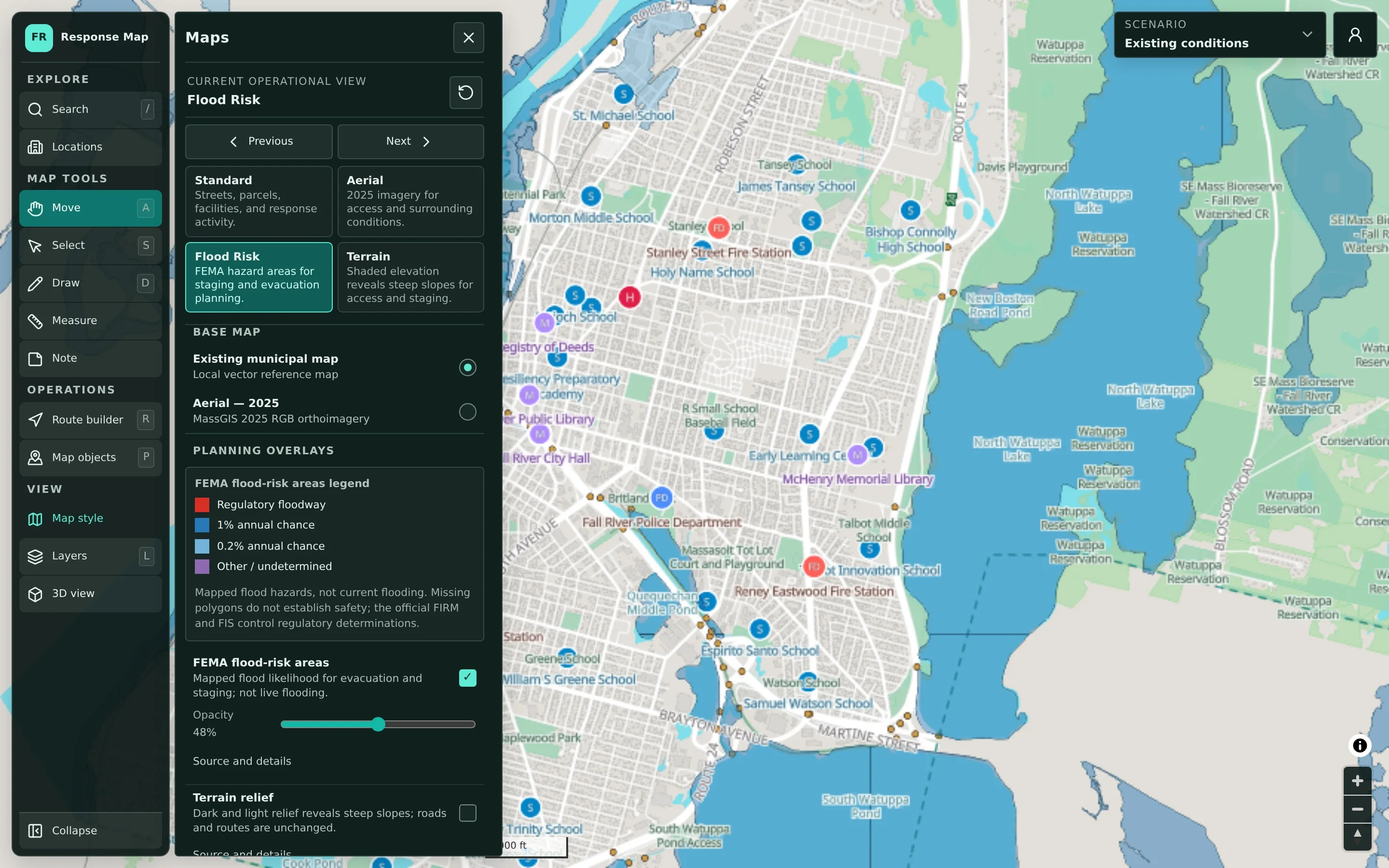
Toggle facilities, transportation, property, and environmental layers such as mapped flood risk.
Department collaboration
Authorized staff across departments contribute to shared scenarios.
Administrative backend
Manage maps, scenarios, accounts, and who can see and edit what.
See CivicMaps in detail.
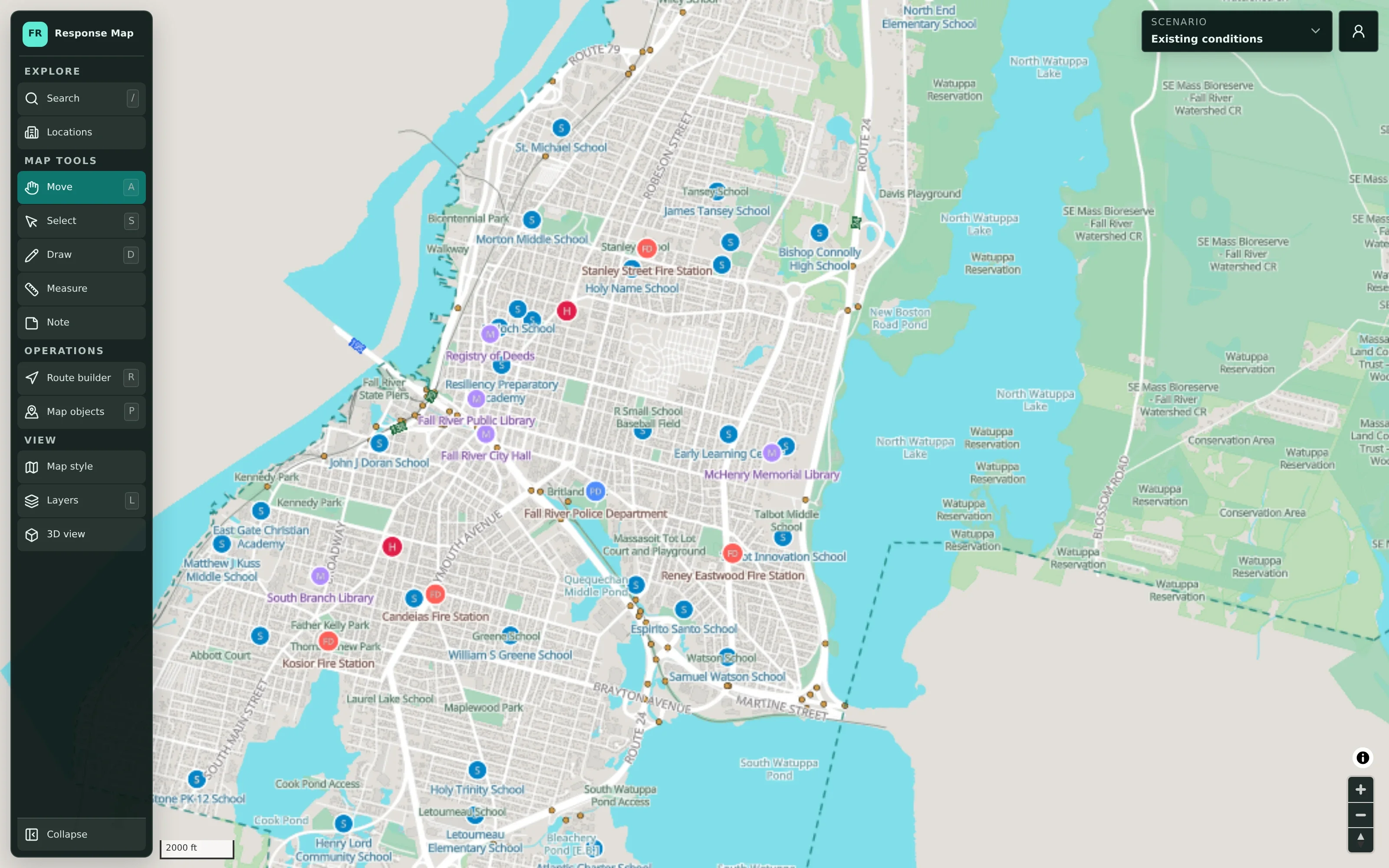
One detailed map that every department recognizes.
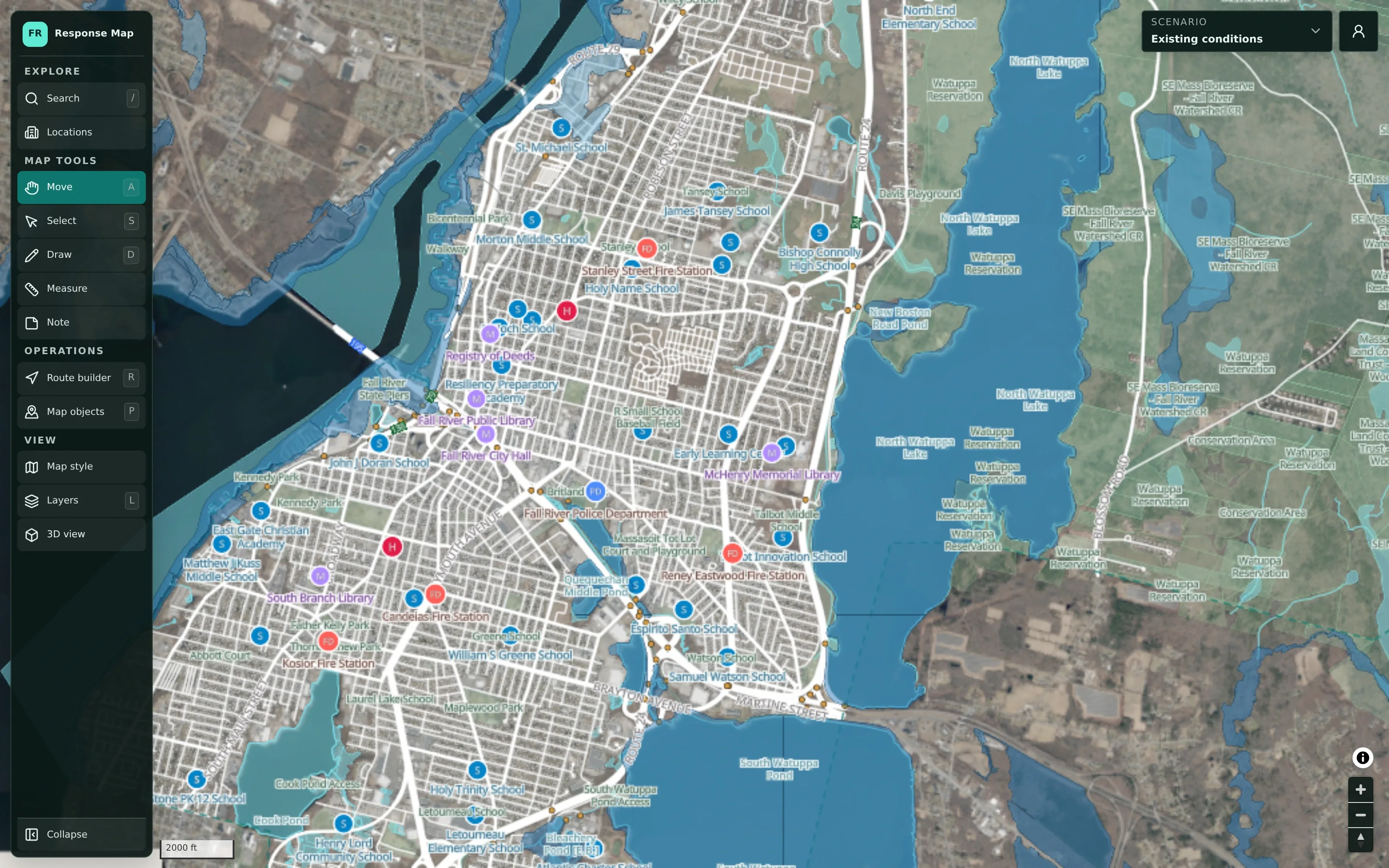
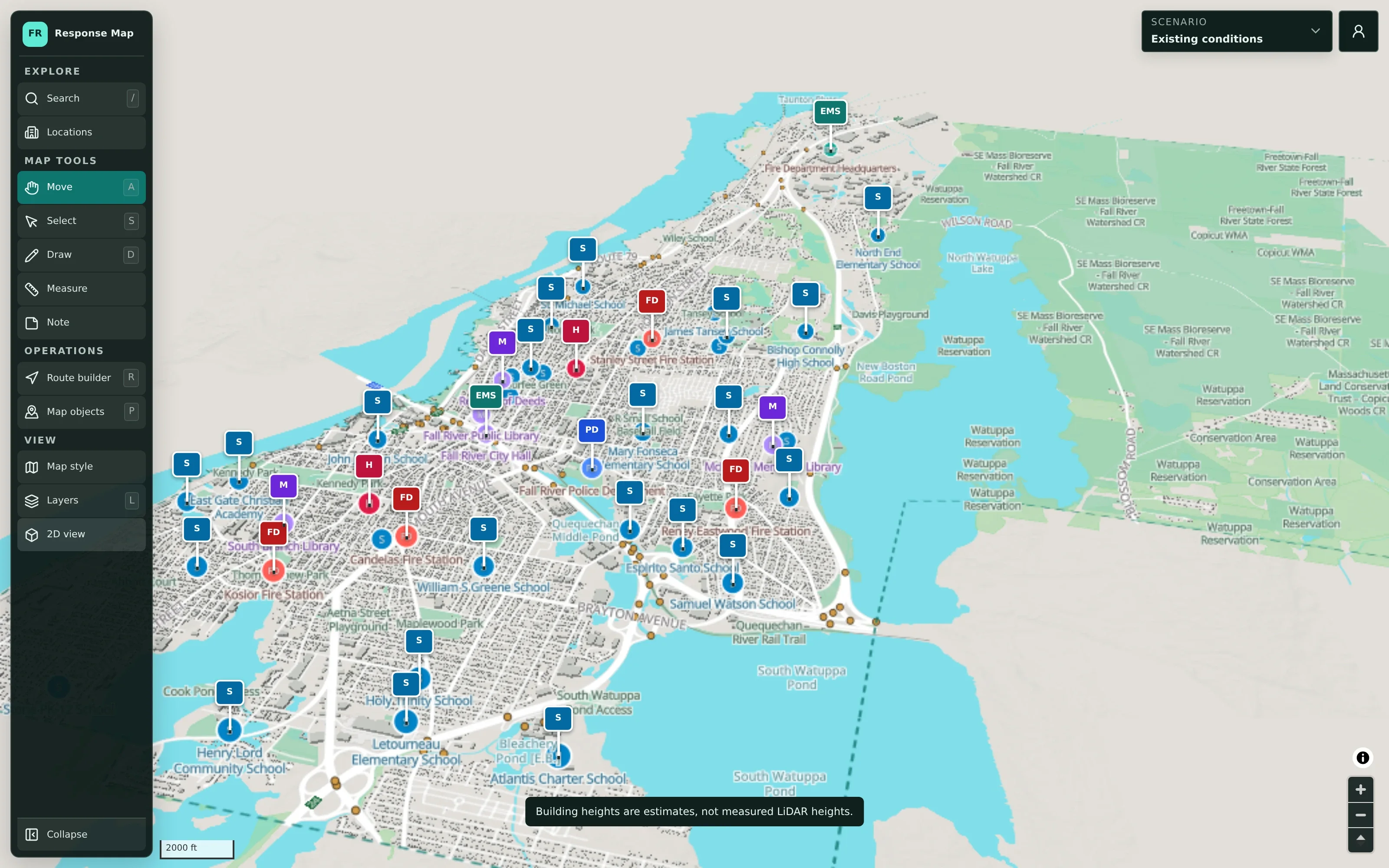
CivicMaps starts with a detailed base map of your municipality: streets, buildings, water, boundaries, and public facilities such as schools, fire and police stations, hospitals, and municipal buildings — each with its data source and stated limitations.
- Standard, aerial, flood-risk, and terrain views
- Public facilities with sources and limitations shown
- A 3D view to help stakeholders orient themselves
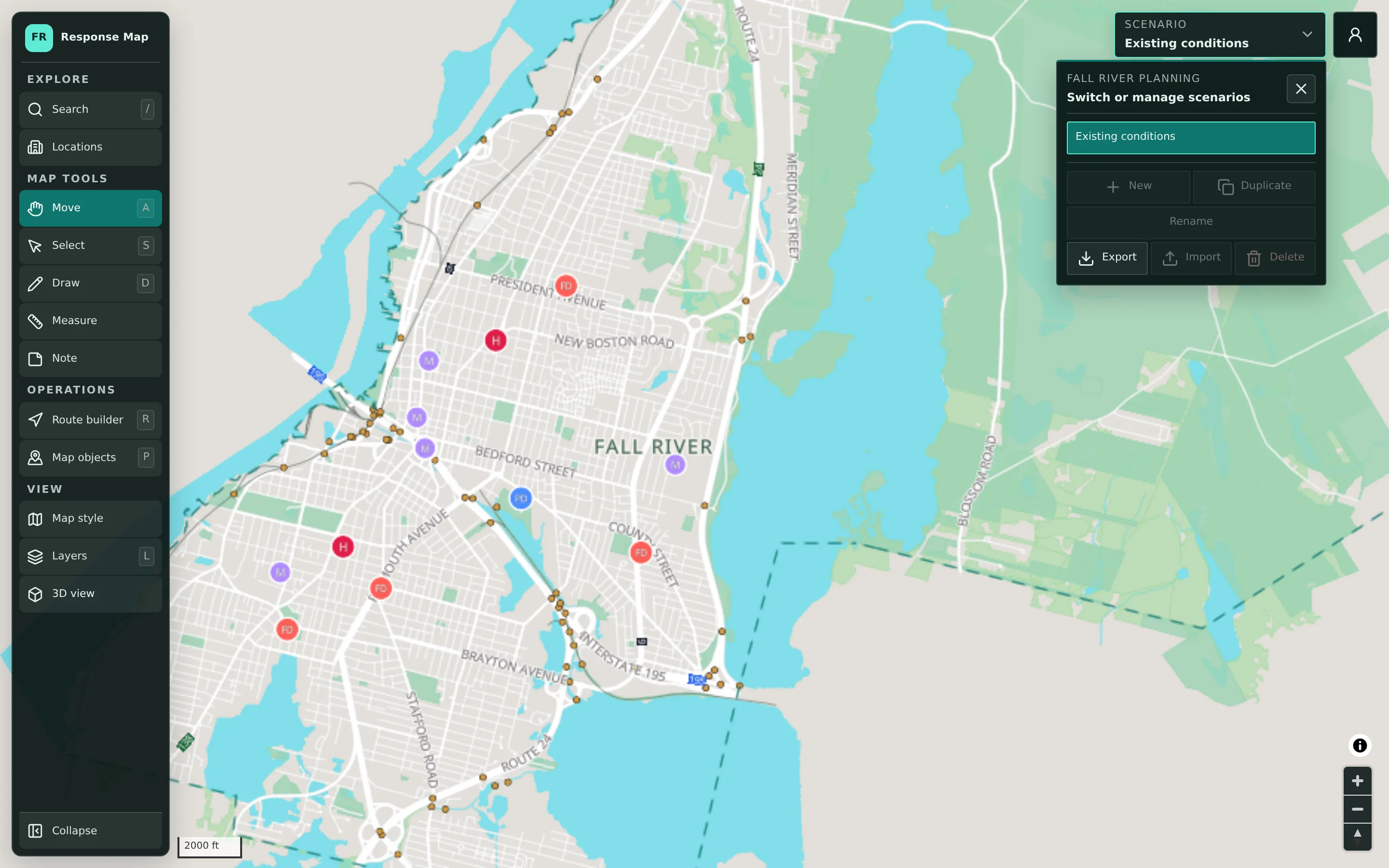
A separate scenario for every plan and exercise.
Each scenario holds its own plan on the shared base map. Duplicate last winter’s storm plan as a starting point, keep a summer event plan alongside it, and export scenarios for briefings or records.
- New, duplicate, rename, import, export
- Plan layers separated from reference layers
- Map objects tracked by status, from draft to active
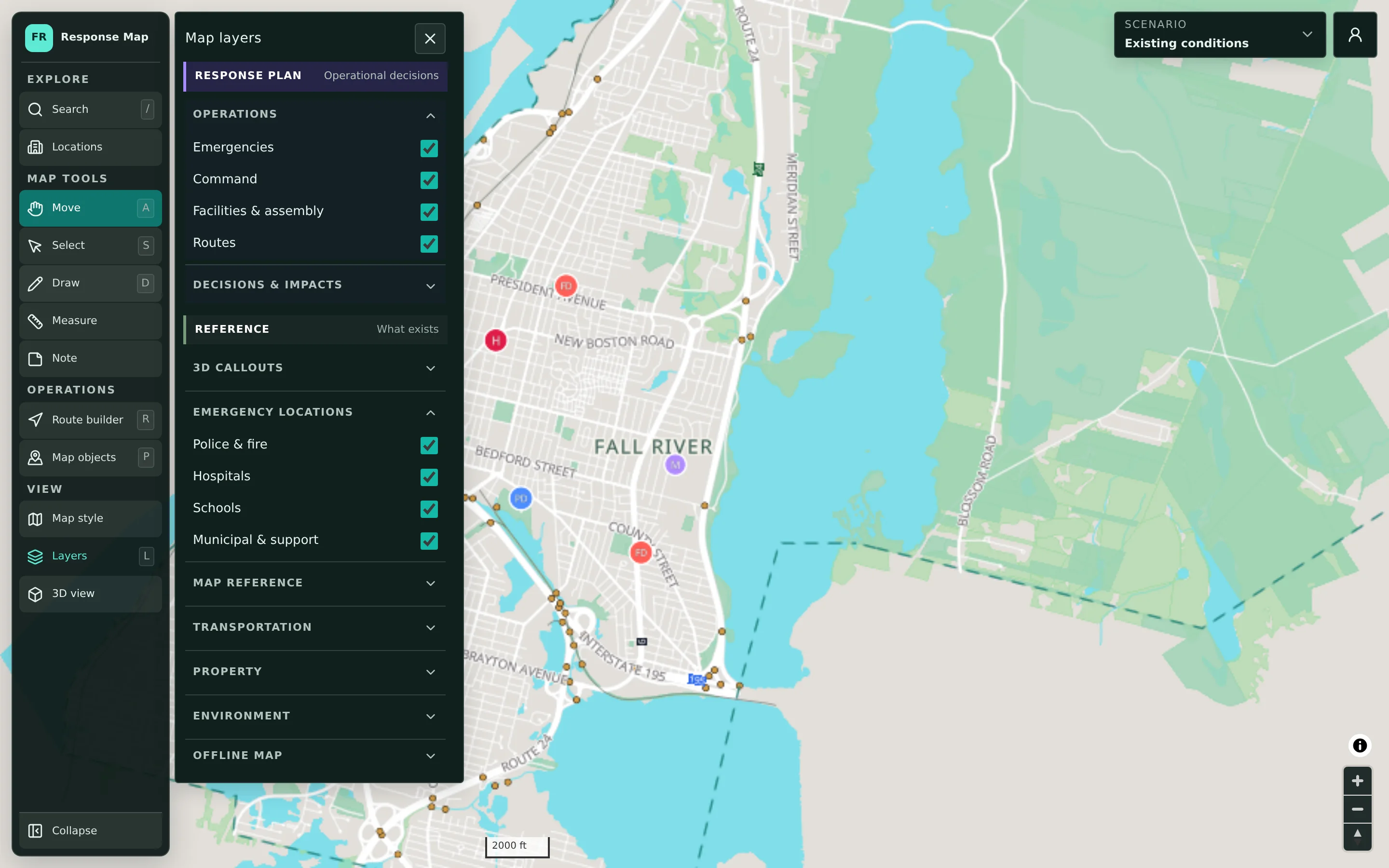
Decisions on top. Reference data underneath.
Response-plan layers — emergencies, command, facilities and assembly, routes — sit above clearly separated reference layers. Planners can switch context without losing track of what is a decision and what is base data.
- Operational and reference layer groups
- Mapped FEMA flood-risk areas as a planning overlay
- Offline map download for field reference
Plan together, share deliberately.
Authorized staff from each department sign in to contribute to shared scenarios. Plans stay private by default and are shared with the agencies, partners, and neighboring municipalities that need them.
- Sign-in for authorized municipal accounts
- Department contributions to the same scenario
- Deliberate sharing with partner agencies and neighbors
Designed for the work before and between events.
CivicMaps is for high-level planning and coordination: the shared picture departments build ahead of time and revisit after an event. It is not real-time dispatch, CAD, or incident command software, and it does not display live incident data.
A shared picture for every department at the table.
CivicMaps is typically led by emergency management, with contributions from every department that has a role in the plan.
Emergency Management
Maintain hazard and event scenarios, and run exercises from a shared map.
Fire & EMS
Plan staging areas, access routes, and coverage considerations for planned events and hazards.
Police
Coordinate traffic control points, detours, and perimeters for events and planned operations.
Public Works
Plan plow priorities, road closures, debris staging, and equipment locations.
Schools
Coordinate shelter, reunification, and transportation considerations with municipal partners.
Administration
Brief officials and share plans with neighboring municipalities and regional partners.
Set up around your municipality’s geography and teams.
CivicTally prepares the base map from supported public geographic data and sets up access around your departments. No GIS expertise is required to use it.
How implementation worksBase map & data
Assemble a base map from supported public sources and any data you choose to provide.
Accounts & access
Set up authorized municipal accounts and decide who has access to which plans.
Starter scenarios
Outline initial scenarios — a seasonal storm, a large event, an upcoming exercise.
Training
Walk planners through drawing, scenarios, and sharing before the first working session.
CivicMaps is for planning and coordination. It is not real-time emergency dispatch, CAD, or incident command software.
Fall River, MA — Planning map
A public guest view of the planning map with public facilities, flood-risk overlays, map tools, and an empty public scenario. Planning scenarios require an authorized sign-in.
Public guest view. Planning content is private; the public view shows reference data only.
Go deeper into CivicMaps.
Detailed pages for each part of the product, with workflows, screenshots, and answers to common questions.
Questions about CivicMaps
Can’t find what you’re looking for? We’re happy to walk through your situation.
Ask us a questionWhat is a planning scenario?
A scenario is a self-contained plan on your shared base map — for example, a winter storm, a large public event, or a tabletop exercise. Each scenario has its own drawings, locations, routes, and notes, and can be duplicated, renamed, imported, or exported.
Can multiple departments work on the same plan?
Yes. Authorized staff from different departments can sign in and contribute to shared scenarios, so police, fire, public works, schools, and administration plan from the same picture.
How does CivicMaps support tabletop exercises?
Facilitators can build an exercise scenario ahead of time, then use the shared map during the session to walk through decisions, mark locations and routes, and capture notes. The scenario remains available afterward for review.
Who can see our plans?
Planning scenarios are private to authorized accounts by default. Sharing is deliberate: you decide which agencies, partners, or neighboring municipalities can view a plan. A public guest view, if enabled, shows reference data only.
Can we share plans with neighboring municipalities?
Yes. Plans can be shared with the regional partners and neighboring communities you choose, which helps with mutual aid and regional events.
Do we need GIS experience or staff?
No. CivicMaps is designed for planners, not GIS specialists. CivicTally prepares the base map from supported public geographic data, and drawing and annotation tools are straightforward to learn.
Where does the map data come from?
Base maps are assembled from supported public geographic sources — for example statewide GIS data and OpenStreetMap — along with any data your municipality chooses to provide. Each location shows its source and stated limitations.
Is CivicMaps real-time dispatch or incident command software?
No. CivicMaps is for high-level planning and coordination. It does not replace computer-aided dispatch, 911 systems, or incident command tools, and it does not show live incident data.
Can plans be used offline?
The map can be downloaded for offline reference. Editing scenarios and building routes still require a connection.
What does implementation involve?
CivicTally prepares your base map, sets up accounts and access, outlines starter scenarios with your team, and trains planners before the first working session.
See how CivicMaps could work for your community.
Tell us about your municipality and what you’re trying to improve. We’ll walk through the product with your situation in mind — no obligation.