CivicBudget
Municipal Budget Transparency
Make your municipal budget easier for everyone to understand.
CivicBudget turns municipal budget documents into accessible, interactive public information that helps residents better understand local spending and financial priorities.
- Built from your official budget documents
- Lightweight and quick to launch
- Your municipality’s branding
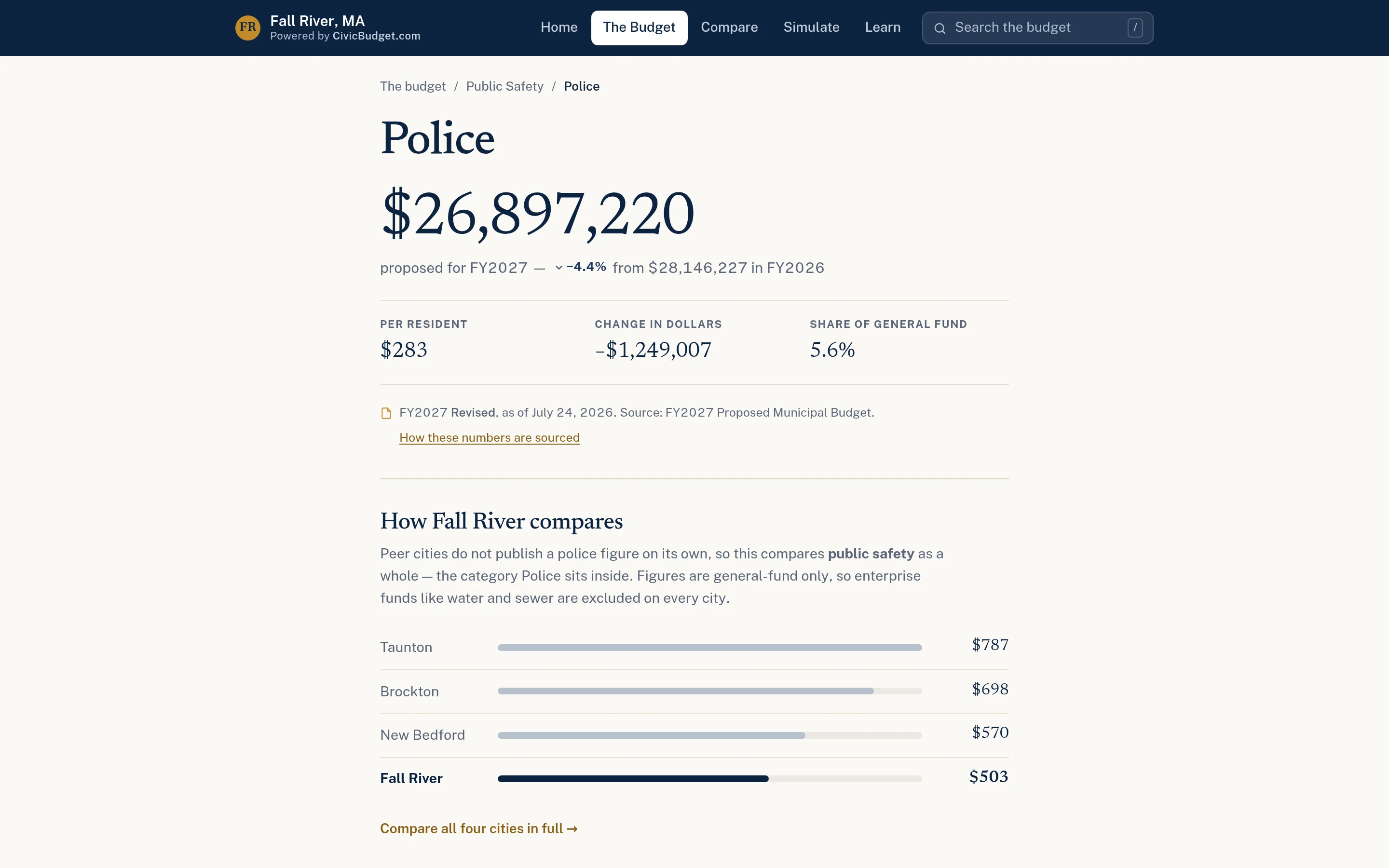
Budgets are public. Understanding them shouldn’t require a finance degree.
Most municipal budgets are published as long PDF documents organized for accountants and auditors. Residents who want to know what the town spends on schools or public safety — or how that compares to neighbors — give up long before they find the answer.
Hundreds of PDF pages
Budget books are thorough, but nearly impossible to navigate for a resident with one question.
Numbers without context
A department total means little without last year’s figure, a per-resident cost, or a comparison.
Repeated questions at hearings
Finance staff and officials spend public meetings explaining basics that could be explained once, clearly.
From budget book to public budget site.
CivicBudget is intentionally lightweight. It works from documents you already produce, and it is designed to launch without a major IT project.
- Step 1
Share your budget documents
Provide the official proposed or adopted budget and any supporting public data you want included.
- Step 2
Structure the data
CivicTally organizes line items, departments, and categories into a consistent, searchable format.
- Step 3
Add context
Charts, prior-year changes, per-resident figures, and peer comparisons where suitable data exists.
- Step 4
Publish & update
Launch under your branding, citing official sources, and update as new budget versions are released.
Clear, accurate, and easy to explore.
CivicBudget presents your budget — it does not replace your financial systems. It is a public communication tool, not accounting software.
Interactive budget explorer
Browse the budget from totals down to individual departments and lines.
Searchable spending data
Search any department, line item, or revenue source and get answers as you type.
Department breakdowns
A page for each department with its amount, change from last year, and per-resident cost.
Charts & visualizations
Clean, readable bar charts that make proportions and changes obvious at a glance.
Municipal comparisons
Compare spending with peer communities where suitable public data exists.
Official sources
Every figure traces back to a published, official document, cited on the site.
Municipal branding
Presented with your municipality’s name and identity so residents know where they are.
Straightforward implementation
Built from documents you already publish, without new software for your finance team to learn.
See CivicBudget in detail.
Start with the question residents actually have.
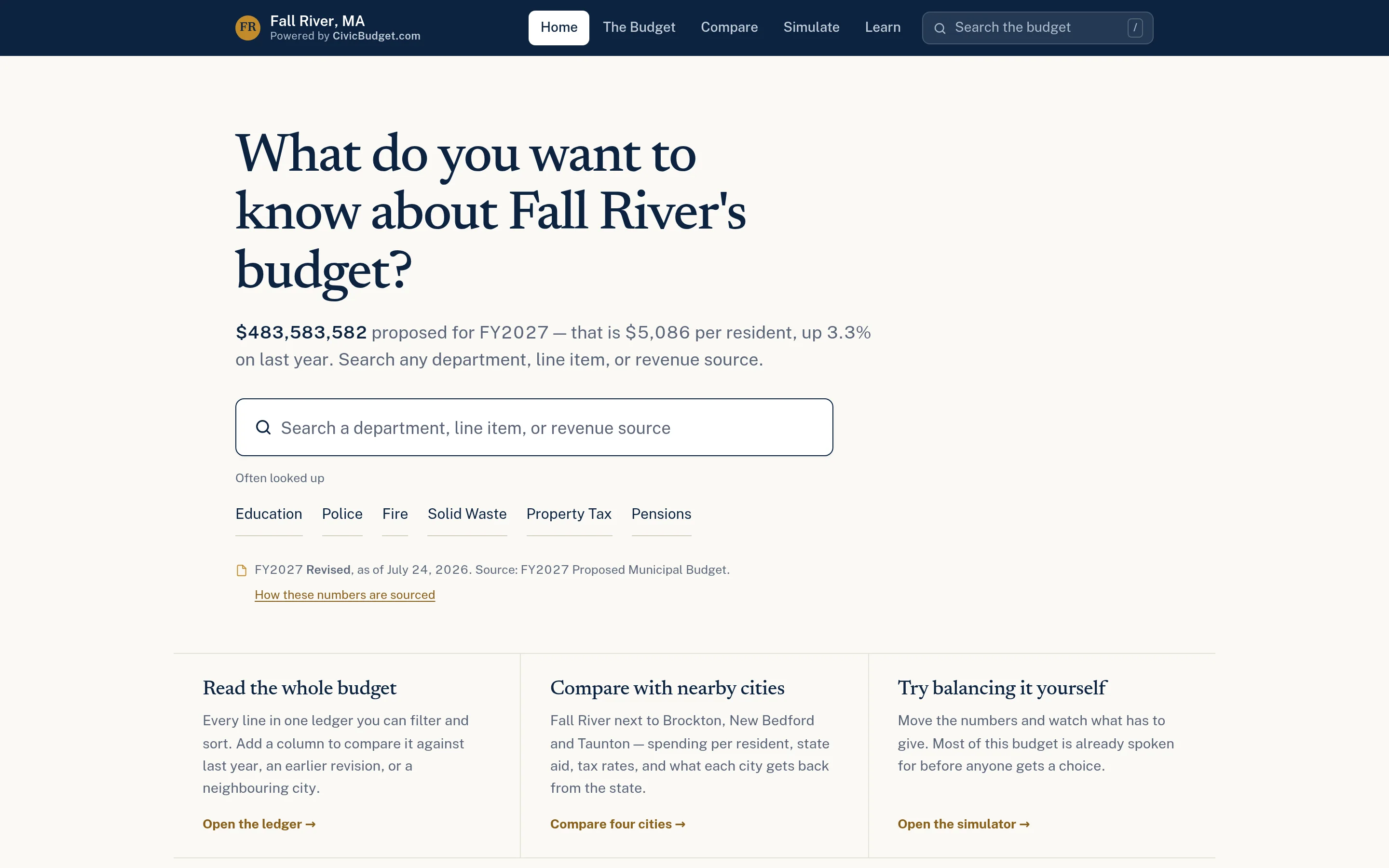
The home page leads with the total, a per-resident figure, and a search box. From there residents can read the whole budget line by line, compare with nearby communities, or explore a specific department.
- Plain-language totals and per-resident figures
- Instant search across departments and line items
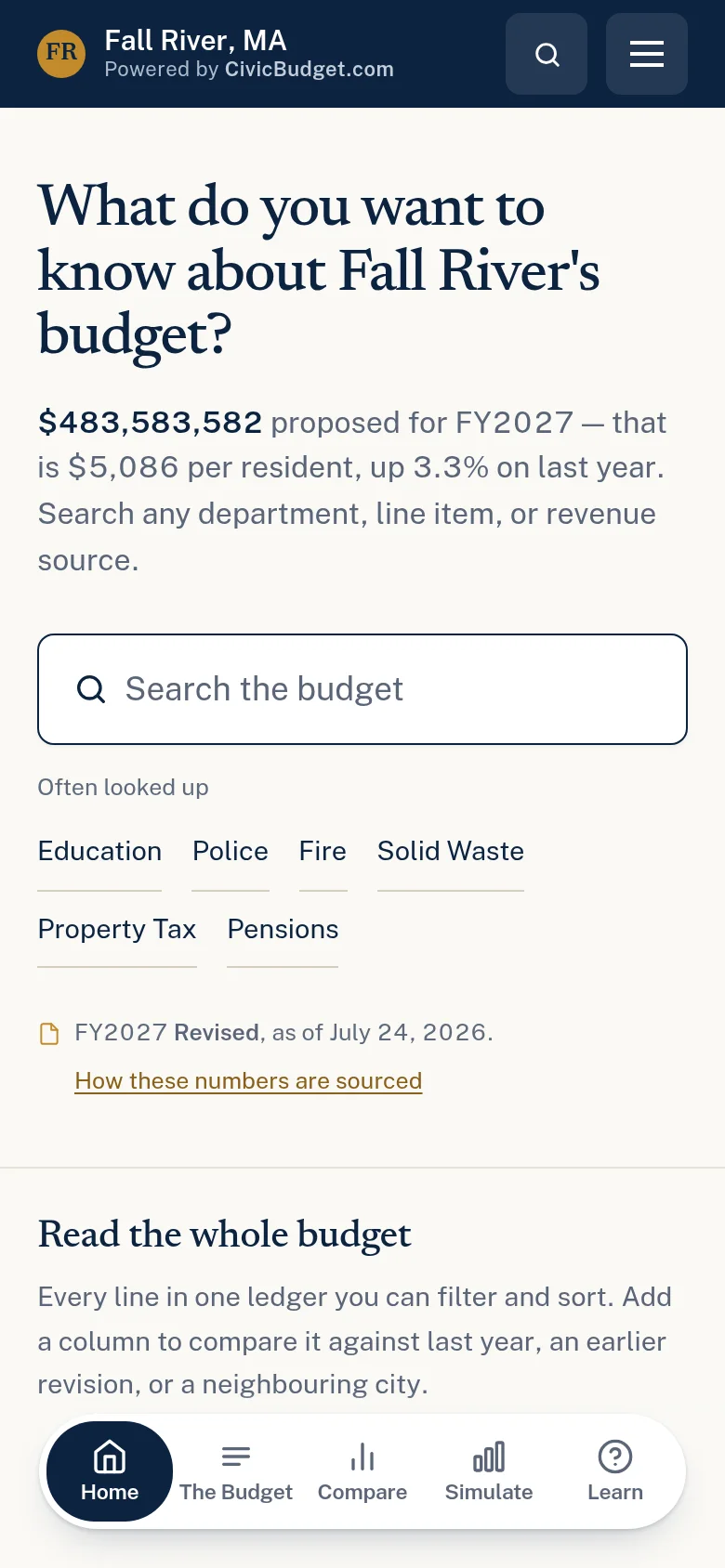
- Sortable, filterable full ledger
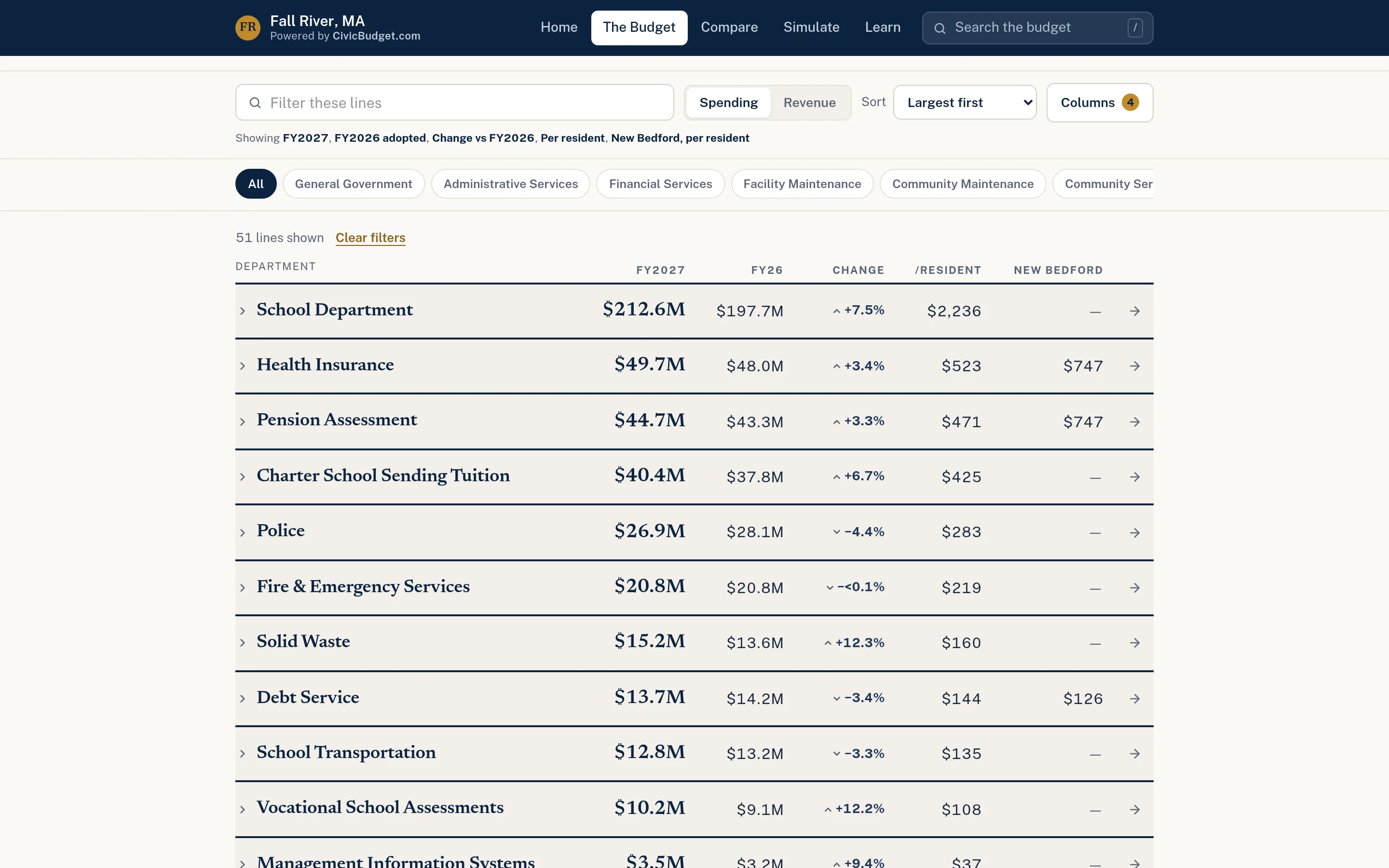
Every department, explained on its own page.
Each department page shows the proposed amount, the change from last year, the cost per resident, its share of the general fund, and how it compares with peer communities — with the source cited beneath.
- Amount, year-over-year change, and per-resident cost
- Share of the general fund
- Version history as budget revisions are published
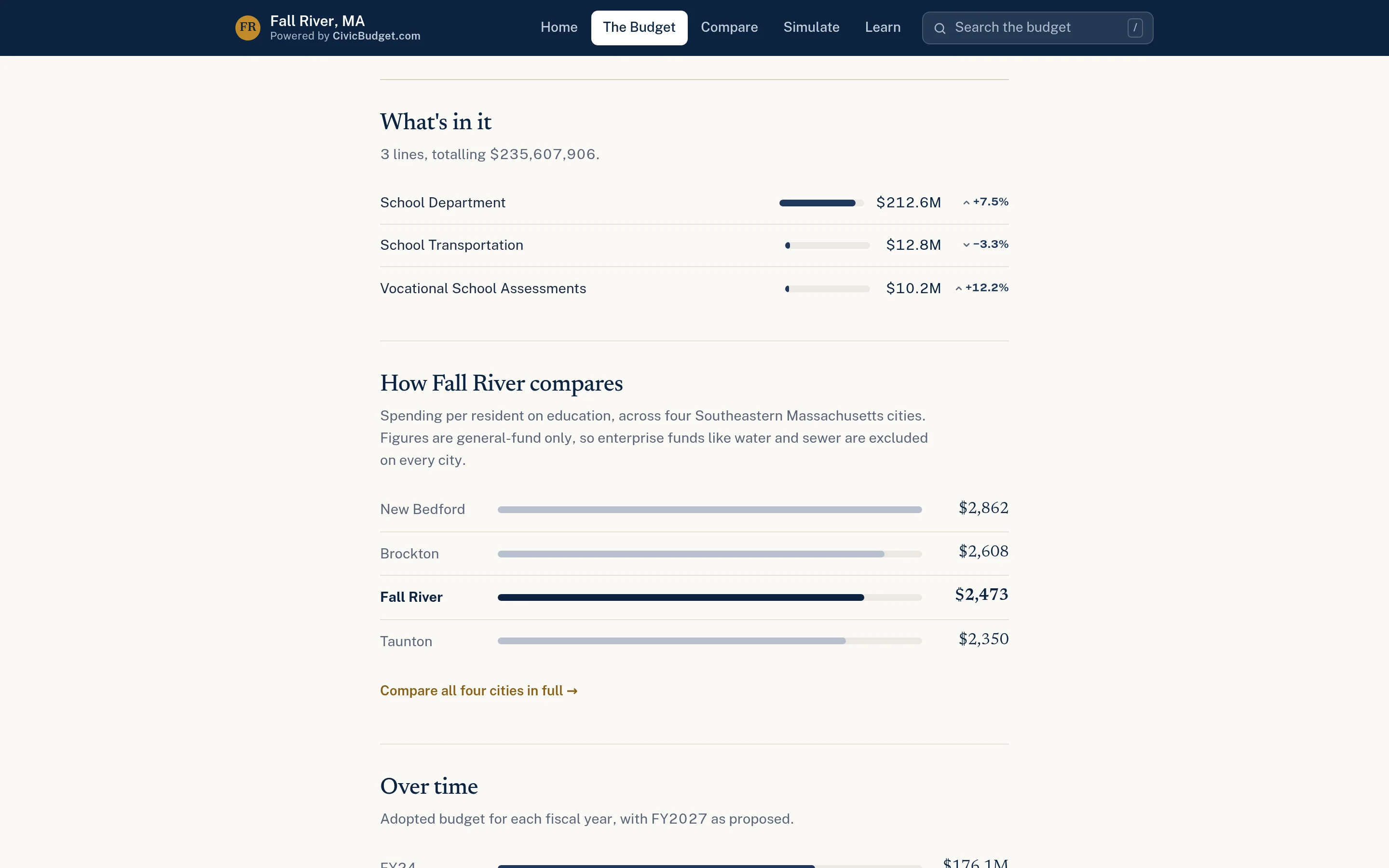
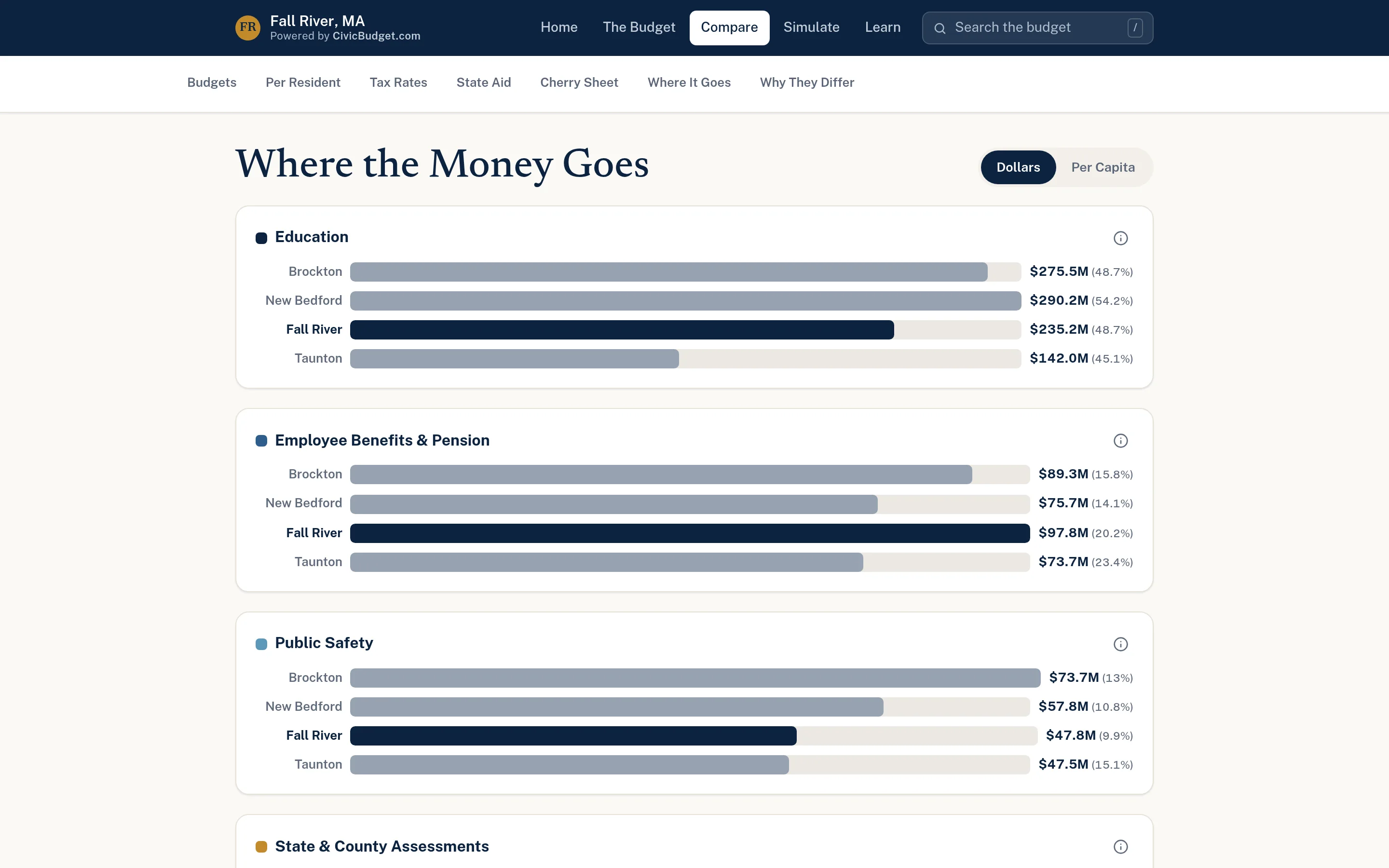
Context from communities like yours.
Where suitable public data exists, CivicBudget places your budget beside peer municipalities — in total dollars or per resident — with a plain explanation of why communities differ.
- Per-resident and total-dollar views
- Category-by-category comparison
- Sources and limitations explained
Helpful for everyone who explains the budget.
CivicBudget is often the simplest place to start with CivicTally — a focused, affordable step toward clearer public information.
Finance Directors
Publish an accurate, cited, easy-to-navigate version of the budget you already prepared.
Town & City Administrators
Give residents and officials a shared, factual starting point for budget conversations.
Elected Officials
Answer constituent questions with a link instead of a page number in a PDF.
Communications
Share specific departments or comparisons during budget season with clear visuals.
School Committees
Show education spending in context alongside the rest of the municipal budget.
Residents
Understand where public money goes before hearings, town meetings, and elections.
Simple to launch. Simple to keep current.
CivicBudget is designed as an easy entry point into the CivicTally portfolio — lightweight, focused, and built around documents you already publish.
How implementation worksBudget documents
Provide your official proposed or adopted budget. CivicTally handles structuring the data.
Peer selection
Choose comparable communities, where their budgets are published in a usable form.
Branding & review
Apply your municipality’s branding and review figures with finance staff before launch.
Annual updates
Add new budget versions as they are released, keeping earlier versions for comparison.
CivicBudget presents budget allocations from published documents. It does not process transactions or replace financial or accounting systems.
Fall River, MA — Budget explorer
An interactive explorer for the FY2027 proposed budget, with a searchable ledger, department pages, peer comparisons, and cited public sources.
Independent civic project — not affiliated with or endorsed by the City of Fall River.
Go deeper into CivicBudget.
Detailed pages for each part of the product, with workflows, screenshots, and answers to common questions.
Questions about CivicBudget
Can’t find what you’re looking for? We’re happy to walk through your situation.
Ask us a questionWhere does the budget data come from?
From your municipality’s official, published budget documents — typically the proposed or adopted budget. Every page cites its source, so residents can always check the original.
Is CivicBudget accounting or financial management software?
No. CivicBudget is a public communication tool. It presents budget information from published documents; it does not process transactions, manage accounts, or replace your financial systems.
What financial information is shown?
Budget allocations by department, category, and line item, with prior-year figures, changes, per-resident amounts, and shares of the general fund where the data supports them. It shows budgeted amounts, not individual payments or vendor transactions.
How do department spending breakdowns work?
Each department gets its own page with its total, the change from the prior year, the cost per resident, and a breakdown of its budget lines. Where earlier budget versions were published, changes between versions can be shown too.
How are municipal comparisons chosen?
You choose peer communities with CivicTally, based on size, region, or structure. Comparisons are included only where those communities publish budgets in a usable form, and the site explains the limitations of comparing municipalities.
Can it carry our municipality’s branding?
Yes. The site is presented with your municipality’s name and branding so residents understand whose budget they are exploring.
How are annual updates handled?
When a new proposed, revised, or adopted budget is published, it is added to the site. Earlier versions can remain available so residents can see how figures changed through the process.
Does our finance team need to learn new software?
No. Your team provides the documents they already produce and reviews figures before launch. CivicTally handles the structuring and publishing.
What does implementation involve?
Share your budget documents, select any peer communities, review the structured figures with finance staff, and approve branding. CivicBudget is intentionally lightweight, which makes it a straightforward first project.
See how CivicBudget could work for your community.
Tell us about your municipality and what you’re trying to improve. We’ll walk through the product with your situation in mind — no obligation.